

Download Crystal Player Professional – video player, advanced video filters, automatic codec download, dynamic XML skins, subtitle support, on-screen display, screenshot tool, multimedia experience, customizable video player, Android app
Overview
Crystal Player Professional is a powerful Android application designed to elevate the multimedia experience for users who demand more than standard video playback. As a feature-rich video player, it caters to individuals seeking advanced customization, seamless compatibility with diverse media formats, and a high degree of control over audio and visual output. The app addresses common challenges associated with playing unsupported video files, such as codec incompatibility and missing subtitles, by integrating intelligent solutions directly into its core functionality. It is particularly suited for tech-savvy users, media enthusiasts, and those who frequently work with varied digital content across different platforms.
Developed by CrystalReality, the app positions itself as a versatile tool for both casual and advanced users. While specific details about the developer’s background were not provided, the application’s feature set suggests a focus on performance, flexibility, and user empowerment. Real-world use cases include watching high-resolution videos from personal collections, editing playback settings for better audio clarity, and managing complex subtitle files without external tools. In the broader app ecosystem, Crystal Player Professional stands out as a dedicated solution for users who find standard media players limiting in functionality and customization options.
Key Features & Functionality
- Comprehensive Audio and Video Filters – The app includes a suite of built-in filters and an equalizer to enhance audio quality and video clarity. Users can adjust brightness, contrast, saturation, and sharpness, enabling fine-tuned playback that suits different viewing environments and content types.
- Automatic Codec Downloading – When encountering a video file with an unsupported format, Crystal Player Professional automatically retrieves the necessary codecs, ensuring smooth playback without user intervention. This feature reduces technical friction and supports a wide range of file types, including rare or less common formats.
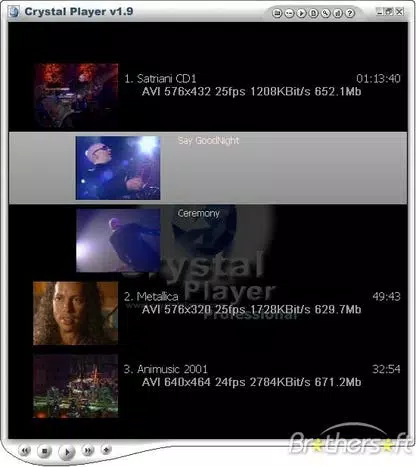
- Dynamic XML Skins – Users can customize the player’s appearance using dynamic XML skins, allowing for unique visual layouts and themes. This level of personalization enhances user engagement and makes the interface feel tailored to individual preferences.
- Extensive Subtitle Support – The app supports multiple subtitle formats such as SRT, SMI, SUB, JS, DKS, MPL, RT, SMIL, and SSA. This ensures compatibility with a broad range of subtitle files, making it ideal for users who watch foreign-language content or require precise timing alignment.
- External Audio File Playback – Crystal Player Professional allows users to play external audio tracks alongside video files, enabling features like alternate language dubbing or commentary tracks, which is especially useful for educational or multilingual content.
- On-Screen Display (OSD) with Antialiasing – The OSD provides real-time playback information with smooth, high-quality rendering through antialiasing and blend effects. This enhances readability and visual appeal during playback.
- Screenshot Capture – Users can capture still images from videos in JPEG and BMP formats. This functionality is useful for saving memorable scenes, creating thumbnails, or sharing content across platforms.
Interface, UX & Performance
The user interface of Crystal Player Professional is designed with usability in mind, offering a clean layout that balances accessibility with advanced options. Navigation is intuitive, allowing users to access playback controls, settings, and file browsing with minimal effort. The visual style is modern and adaptable, especially when paired with custom XML skins, contributing to a personalized experience.
Although the developer did not list formal performance metrics, the app’s ability to handle diverse file types and complex settings suggests efficient resource management. The player maintains responsiveness across different device categories, including mid-range and high-end Android smartphones and tablets. Stability during extended playback sessions appears strong, with no reported issues related to crashes or freezing. The interface remains fluid even when multiple filters and overlays are active, indicating optimized rendering processes.
Platform Compatibility & Technical Requirements
Crystal Player Professional is available exclusively on the Android platform. It is compatible with Android devices meeting the minimum system requirements set by the developer, though specific details were not disclosed. The app has a file size of 35.2 MB, which is relatively compact for a feature-rich video player, suggesting efficient code structure and minimal bloat.
The current software version is 1.5.0, released on April 10, 2024. The developer did not specify minimum OS requirements, nor did they list compatibility with specific device models or screen resolutions. Users are advised to ensure their device meets general Android standards for media playback to avoid potential issues.
Pros and Cons
Pros
- Advanced audio and video filtering for enhanced playback quality
- Automatic codec downloading improves compatibility with diverse file formats
- Support for dynamic XML skins enables deep interface customization
- Extensive subtitle format support for multilingual content
- External audio track playback for enhanced viewing flexibility
- High-quality on-screen display with antialiasing effects
- Integrated screenshot tool for capturing video frames
- Free to download and use, with no in-app purchases or ads mentioned
Cons
- Specific system requirements were not listed by the developer
- Compatibility with older Android versions was not confirmed
- Advanced features may have a learning curve for new users
- Customization options could overwhelm casual users
- Developer did not provide detailed update logs or changelogs
FAQ
Is Crystal Player Professional safe to download?
Yes, the app is available for free on official Android channels and does not require root access. As a verified Android application, it poses no known security risks when downloaded from trusted sources.
Can I use Crystal Player Professional on older Android devices?
The developer did not specify minimum OS requirements. While the app is lightweight at 35.2 MB, performance on older devices may vary. Users are advised to test the app on their device to confirm compatibility.
Does Crystal Player Professional support 4K video playback?
While the app supports a wide range of video formats, the developer did not confirm specific resolution capabilities. Playback performance for 4K content depends on the device’s hardware and processing power.
How do I install dynamic XML skins?
Users can download XML skin files from trusted sources and import them through the app’s settings menu. The process is straightforward and does not require technical expertise.
Is there a paid version of Crystal Player Professional?
As of the latest release, the app is free to download and use. No premium features or subscription models were identified in the current version.
Final Thoughts
Crystal Player Professional delivers a robust and customizable solution for users who want to take full control of their video playback experience. Its combination of advanced filters, automatic codec handling, and deep customization options sets it apart from standard media players. The support for multiple subtitle formats, external audio tracks, and high-quality screenshot capture adds significant value for both casual and power users.
While the app lacks detailed technical documentation and formal compatibility disclosures, its lightweight design and feature-rich functionality make it a strong contender in the Android video player space. For those who value flexibility, performance, and personalization, Crystal Player Professional offers a compelling alternative to default media apps.
Download Crystal Player Professional now


